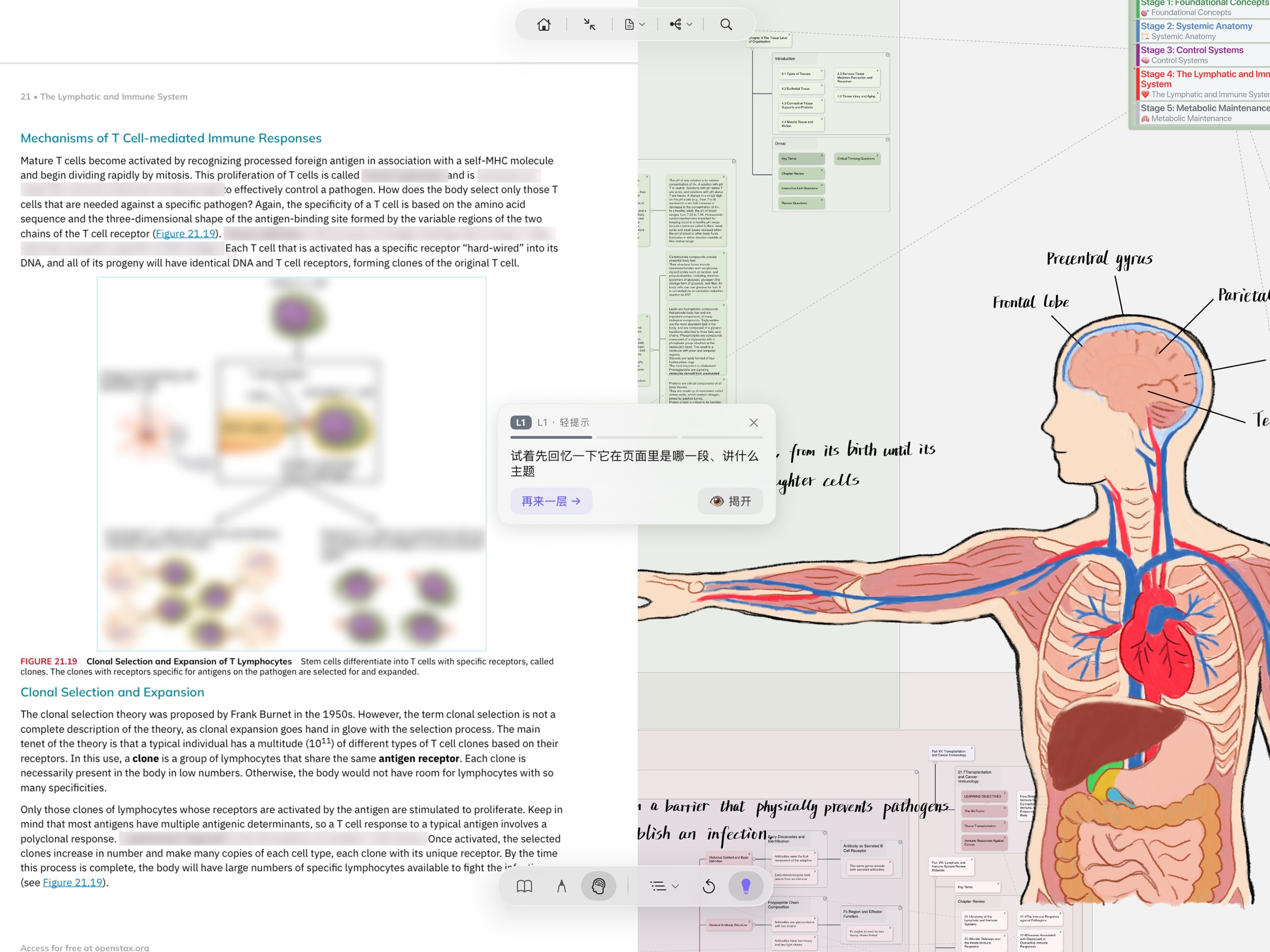
Recall mode — excerpts get a Gaussian blur; active recall plus a tap reveals them (cumulative reveal). The toolification of active recall — switching from "fluency illusion" to actual recall training.
Immersive Mode is not "immersive reading" — it's giving each of the three things you actually do when studying its own dedicated posture. Focus when reading, get a pen when writing, do active recall when remembering. All the traditional UI folds away, and only the tools the current posture needs stay in one bottom capsule. The headline act in Recall mode: excerpts auto-blur, and active recall plus a tap is what reveals them — this is the toolification of active recall from cognitive science.
Recall mode — excerpts get a Gaussian blur; active recall plus a tap reveals them (cumulative reveal). The toolification of active recall — switching from "fluency illusion" to actual recall training.
30-Second Frame
Anyone doing 2+ hours of deep study a day — iPad + Apple Pencil users especially benefit (handwriting-bound HUD, Pencil Pro double-tap / squeeze to switch tools). Or: you already feel "the toolbar is competing for attention" — left sidebar + top toolbar + bottom bookmark bar all fighting for screen. Or: exam crunch where you need Recall mode for active recall.
Casual PDF readers doing light annotation — the traditional UI is enough; the "fold" of immersive doesn't pay off at your usage frequency. Or: you depend heavily on side-by-side mind-map / document panels — Immersive hides them by default (though you can summon them via the top capsule). Or: one-handed quick iPhone use — the capsule adapts to small screens but still demands new muscle memory.
The root pain of "the interface is louder than the content." Most study/notes apps cram Read / Write / Recall into one set of UI — toolbars, sidebars, menus all competing for attention at once. Immersive Mode gives each of those three things its own dedicated posture — what you switch is not "app mode" but "learning mode." Recall mode itself solves another problem: the gap between thinking you understand it (fluency illusion) and actually being able to recall it (active recall).
Interactive Demo · Switch states + Recall reveal
This is a simplified mockup of MN's Immersive Mode (the real thing has Liquid Glass material plus full-screen immersion). Below: a snippet of medical PDF + the top navigation capsule + the bottom capsule. Tap the bottom three-segment control to switch Read / Write / Recall — watch how tools in the capsule change and how the document shifts into the matching posture. Switch to Recall — every excerpt becomes Gaussian-blurred; tap any excerpt to reveal it (cumulative reveal).
Under the hood
"Folding the UI" sounds simple, but doing it so that all features are still reachable + state fully restores on exit + the notebook itself stays untouched — that's what MN 4.4 took 8 dev cycles (Build 17939 → 18136) to ship.
Immersive Mode is gated by the global uiChromeHidden flag — every top / side / bottom traditional UI element is hidden by default, and the document and mind map extend to the screen edge. Only two capsules remain at the bottom: top navigation + bottom mode switcher. Visually, this is "chrome that belongs to the content, not above it."
The bottom capsule isn't an "app switch" — it's a morph. A spring animation of ~0.28s morphs the capsule from one posture to another. Read gives you theme cycling + zoom; Write gives excerpt / brush / lasso / eraser + undo-redo (data-driven, derived from your PencilKit toolset); Recall gives the AI Hint bulb + Cover All toggle.
In Recall, document excerpts go through real Gaussian blur (not a translucent frosted tint): rendered snapshot → downsample → BoxBlur → upsample. Tap = reveal one; revealed excerpts don't blur back (cumulative reveal). Under AI Hint Mode (Pro), long-pressing a blurred excerpt routes through Apple Foundation Models on-device for hints — no network, no cloud, zero cost.
Sticky per-topic: each Study Set independently remembers "default to immersive or not." Open Robbins and you like immersive — next time it auto-enters immersive; open the scratch paper and you don't — next time it defaults to traditional UI. They don't pollute each other.
Recall sessions are zero-persistence: the reveal set, expanded branches, and other state live only in memory and are not written into the notebook itself. A crash or restart returns you to the state before you entered Recall — letting users feel free to "break the status quo to test themselves" without worrying about altering their notes.
Liquid Glass visuals: both capsules use the new design language introduced in Apple iOS 26 / macOS 26 — true floating glass material (not a translucent overlay), adapting to the four palettes Default / Sepia / Gray / Dark. MN is an early adopter of this design language; older systems get an equivalent fallback with a consistent experience.
Entering Immersive Mode and switching between Read / Write / Recall is free. Which AI capabilities each tier includes is whatever the app shows at the time.
Apple Intelligence · iOS 26+ · 4.4
When you can't recall a card, AI Hint gives three tiers — Neighbor Coordinate / Reasoning Prompt / Key Distinction — and they can be generated by Apple Foundation Models right on your device: no network, no AI credits used, your notes never leave your device. Built for libraries, planes, and pre-exam sessions where privacy and offline matter.
"AI Hint model" lets you pick Apple Intelligence (on-device) or cloud LLM. Both paths output the same format — you're choosing where your data flows, not what the experience feels like.
Even if you've picked cloud LLM, going offline (planes, subway, libraries) auto-routes to Apple Intelligence — provided your device supports it. The reverse never happens: pick Apple AI, your data is never silently sent to the cloud.
Requires iOS 26 + an Apple Intelligence-capable device · Full details on the AI overview page →
Read posture
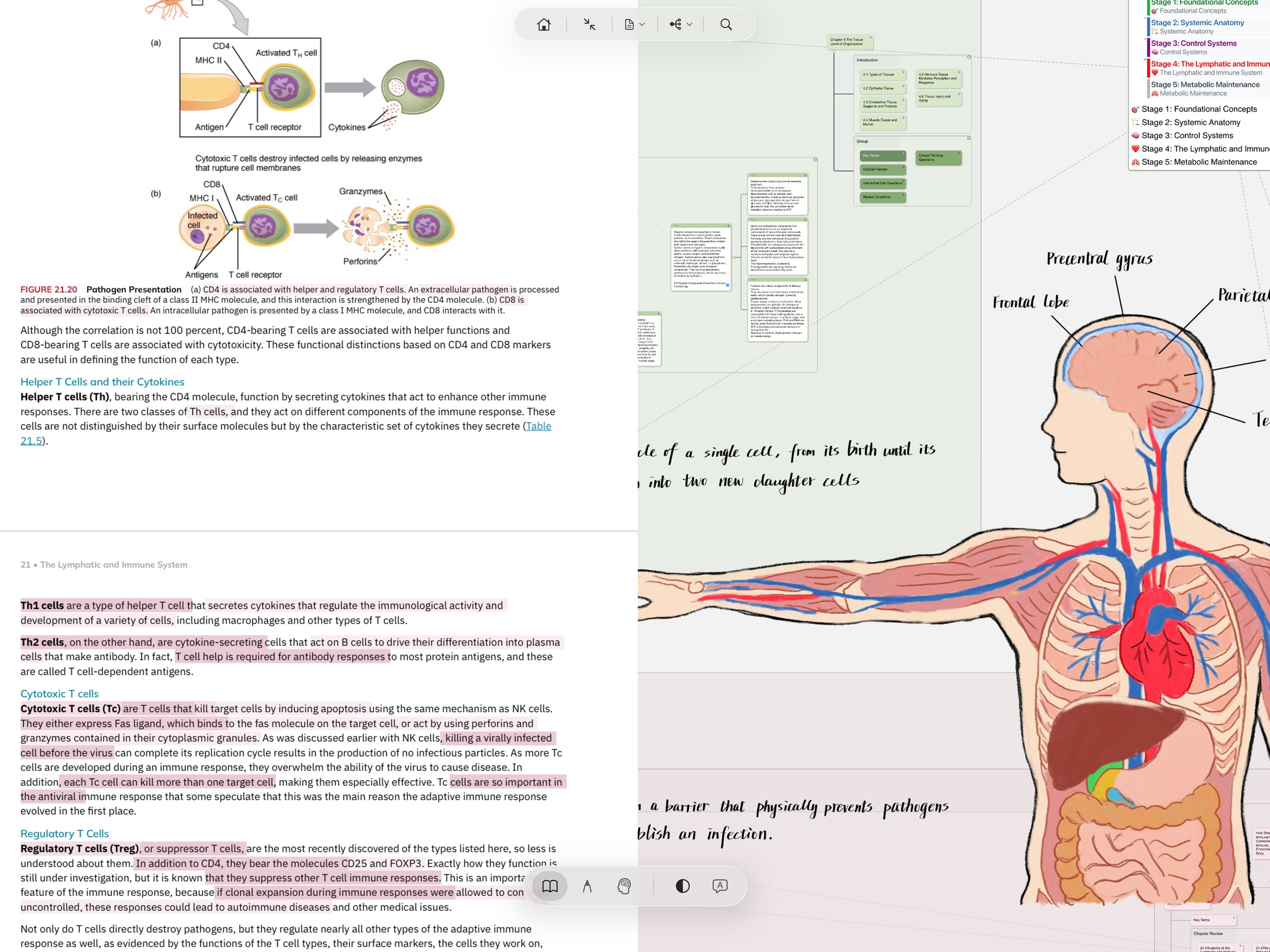
This is what Read posture looks like in actual study. A textbook PDF on the left with multi-color highlights (yellow / pink / green carrying different semantics), hand-drawn anatomy and handwritten notes on the right, a clean split between them. No sidebar fighting for attention, no top toolbar. Two capsules — a top nav capsule (home / exit fullscreen / document switcher / share / search) and a bottom posture capsule — wait off to the side and don't intrude unless you call them.
Compare · Traditional UI vs Immersive Mode
Immersive doesn't replace the traditional UI — it folds it away. Below: the visual difference for the same PDF passage in both postures, plus a full capability table.
Top toolbar, left file list, right mind-map panel, bottom bookmark bar — all visible. Feature-rich, but every time you switch learning posture you have to mentally re-filter "which one do I need this time?".
All chrome folded away. Almost nothing on screen but the document itself + two capsules (top navigation + bottom mode switch). Everything else is reachable through the capsule or context menu — clearer field of view, clearer head.
Recall mode is built around a few well-known ideas about active recall (also called the testing effect in psychology). In plain terms:
1. Read once + try to remember beats reading twice. Even if you get it wrong and have to correct yourself, the act of trying to retrieve is what sticks. This is one of the more robust findings from the last 60 years of learning research. But most self-learners don't do it — because it's tiring, uncomfortable, and there's no built-in tool support. Recall mode is that tool.
2. "Reading smoothly" doesn't mean you remember it. The brain tends to misjudge "I read that fluently" as "I got it." Recall mode blurs the excerpt and forces you not to lean on fluency — only what you can actually pull from memory gets revealed.
3. Making yourself work a little harder pays off. Having to recall before reveal takes maybe 10 seconds longer than just looking — but the memory trace is much deeper.
4. AI Hint doesn't just give the answer. AI Hint surfaces "same card / same chapter / same branch" related context to help you associate, not replace, the act of recalling. The moment AI just tells you the answer, the active recall is gone.
5. Recall session state isn't written into the notebook itself. So you can freely test yourself without worrying that you'll mess up your notes. People avoid doing things that feel bad ("what if I can't remember it?"); if the test might alter the notebook, that hesitation deepens. Zero persistence takes it off the table.
Put together: Recall mode isn't "a PDF reader with a blur filter on top." It's the act of actively retrieving, turned into a tool you reach for every day.
Free download MarginNote 4 · 14-day trial. macOS / iPadOS / iOS. Press ⌘⌥I in any Study Set to enter Immersive Mode — switch to Recall and try a reveal, see whether the things you thought you remembered actually come back.