📌 Featured · MarginNote AI embedded by design · introduced in MN 4.2

Led by You, Elevated by AI.

AI lives inside MarginNote's workflow.
Where it appears — and where it stays out — is by design.

MarginNote's AI isn't a separate mode you switch into — it's embedded across the workflow you already use. Reading, organizing, recalling. You stay in the loop, AI raises the ceiling — but the decisions and the recalling stay with you. Below: where it shows up, and where it deliberately doesn't. Both are design choices.

01 · IN THE WORKFLOW
AI lives where you already work — distributed across the three learning postures (Read / Write / Recall). Not a parallel "AI mode" — embedded in the existing workflow
02 · NEVER REPLACES
Every AI suggestion needs your confirmation. Cards are still yours — what AI generates is a draft, not a final state
03 · HINT, NOT ANSWER
In Recall posture, AI Hint gives cues from the same chapter / branch — never the answer itself. Engineering restraint that protects the testing effect

Where AI shows up

Grouped by the three learning postures — Read, Write, Recall. Each entry is AI embedded into a specific action you already do, not AI as a parallel "mode" or a separate toolbar.

📖 While reading · Read posture 4 places
01

AI book breakdown · turn a thick book into a learnable structure

Auto-extract the structure of a paper or textbook — background / methods / results / discussion — and turn it into a question-driven mind-map skeleton. Every node links back to the exact paragraph in the source. Built on Core ML + Vision + LLM working together.
Multiple modes: smart-dictionary mode (auto-build Title Links for key terms), vocabulary-extraction mode (pull words by CEFR level), question mode (organize by problems instead of by chapter). Two-stage flow — notes first, then organize — breaks past the 100-page limit.

Where: document → "AI breakdown" entry · multiple modes selectable
02

Ask popover

Anywhere in the document or mind map, ask AI in place. Select a passage, hit Ask — the answer is bound to the current passage, no context-switch needed.

Where: document view / mind map view, after selection
03

Chat sidebar · Guide Mode

Start from any card and let AI respond in "Guide Mode" — instead of dumping full answers, AI asks back, hints, or breaks down steps, leaving the deciding and the connecting to you. Every AI output is something you can Accept or Reject: AI helps expand the mind map, but you stay in charge.

Where: right sidebar (collapsible) / right-click any card → "Talk to AI"
04

AI table of contents

When a PDF has no TOC, one click generates a structured, editable TOC — split into Parts / chapters / sections, each with a page range. After generation you can edit it manually and freely switch back to the original.

Where: document sidebar (an "AI generate TOC" button shows up when no TOC exists)
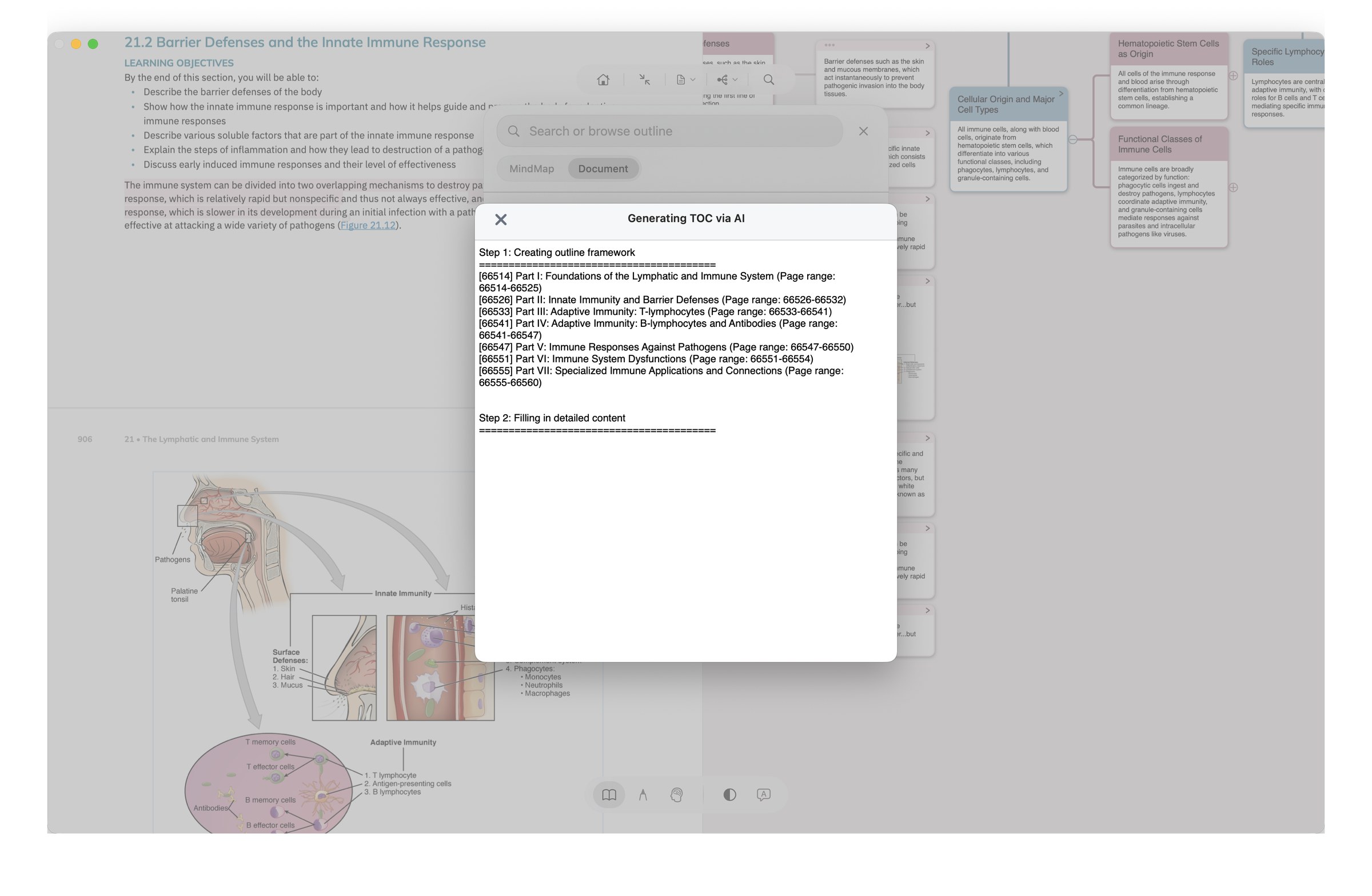
MN AI TOC generation in real use: a dialog runs in two phases — first 'Creating outline framework' to draft the skeleton, then 'Filling in detailed content'; below, each Part is listed with its page range
🃏 While organizing · Write posture 4 places
06

AI quiz · cloze generation

Generate cloze cards directly from your excerpts — fill-in-the-blank plus multiple choice. Right after a chapter, you've got the matching quiz. The gap between "I read it" and "do I actually remember it" closes immediately.

Where: excerpt right-click / card view / review entry
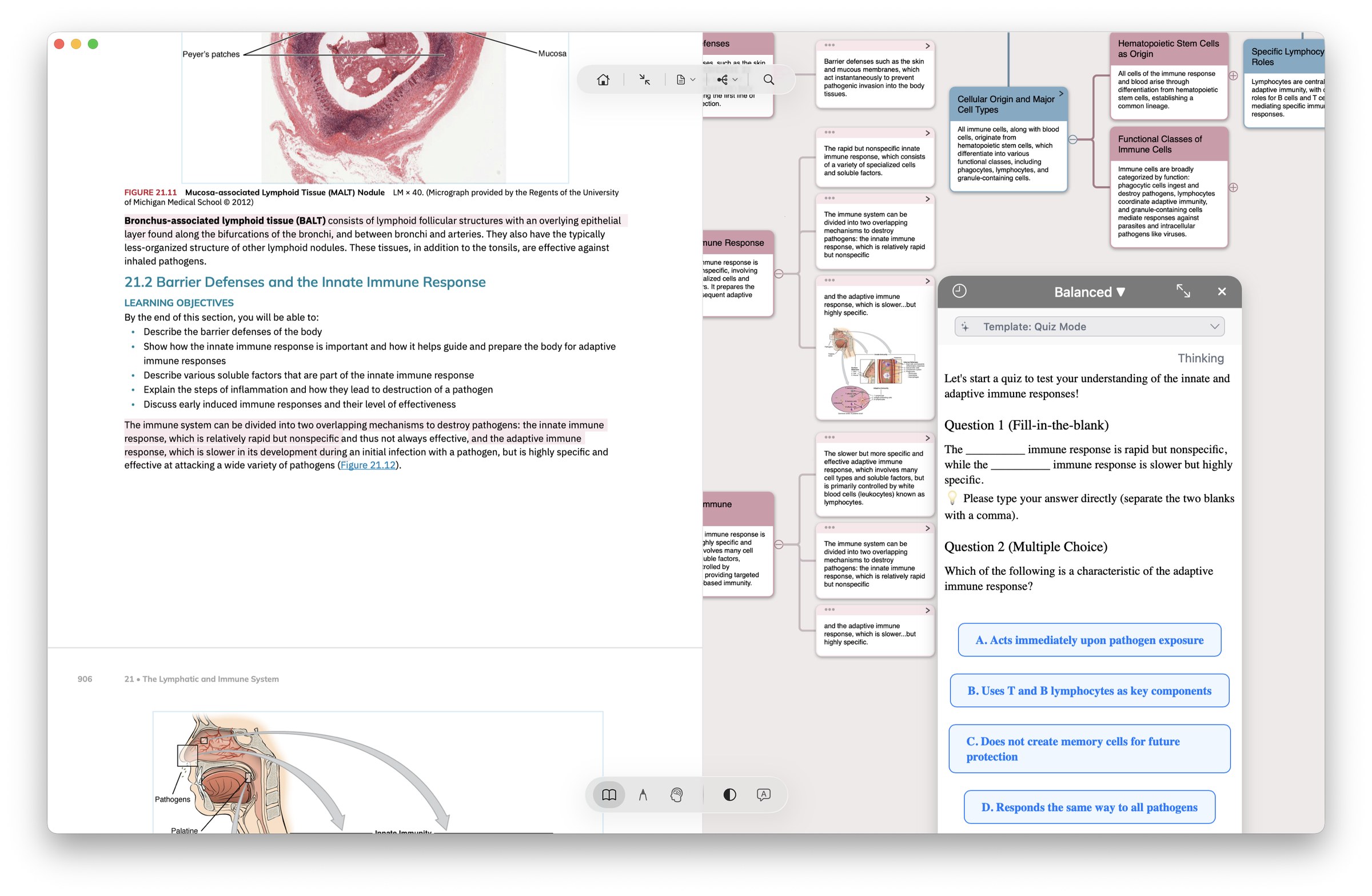
MN AI quiz generation in real use: from an immunology textbook chapter, AI generates a fill-in-the-blank question (innate vs adaptive immune response) and a multiple choice question on adaptive-immune characteristics
07

Title rewrite · batch polish

Hand the manual half of card-making to AI — title rewrite (let AI suggest a better card name) and batch polish (rewrite tone and granularity across multiple notes at once).

Where: card right-click / multi-select batch menu
08

Mind-map restructure

Let AI re-arrange your mind map skeleton — based on content relations: re-organize node hierarchy, merge redundancy, flag gaps. When a chapter feels messy, run AI through it once before you commit.

Where: mind map view, right-click "AI restructure"
05

AI OCR · turn anything into something writable

Recognize formulas / tables / handwriting / images / text boxes / vertical classical Chinese / multiple languages — output as Markdown formulas and tables that write directly into notes / mind maps / cards, no copy-paste. Easy to export onward to Obsidian / Notion too.
Max-only: custom prompts let AI auto-organize / translate / summarize / generate flashcards (5 preset templates included), plus a "deep thinking" mode for complex content.

Where: excerpt right-click / screenshot region / text-box long-press menu
🧠 While recalling · Recall posture 1 place
09

AI Hint Mode (Immersive Recall)

In Recall posture, long-press a blurred excerpt — AI doesn't reveal the answer. Instead it surfaces "same chapter / same branch" related context, helping you associate rather than replacing the act of recall.
This is MarginNote AI's most restrained — and most important — design choice. See "Where AI doesn't show up" below.

Where: Immersive Mode · Recall posture · Pro only

AI doesn't only live in the cloud — Recall hints also run on your device.

Recall Mode's AI Hint can be generated by Apple Foundation Models right on your device — no network, no AI credits used, your notes never leave your device. Built for libraries, planes, and pre-exam sessions where privacy and offline matter.

1. Toggle cloud LLM ↔ Apple AI in Settings

"AI Hint model" lets you pick Apple Intelligence (on-device) or cloud LLM. Both paths output the same "one light hint + one concrete prompt" format — you're choosing where the data flows, not what the experience feels like.

2. Auto-falls back to Apple AI when offline

Even if you've picked cloud LLM, going offline (planes, subway, libraries) auto-routes to Apple Intelligence — provided your device supports it. The hint loop never breaks just because you have no signal. The reverse doesn't happen: pick Apple AI, your data is never silently sent to the cloud.

Requires iOS 26 + an Apple Intelligence-capable device. Devices / regions that don't qualify automatically stay on the cloud path.

Where AI deliberately doesn't show up.

"AI isn't in everything we do. It's in the places where it actually helps — and out of the places where it would break active recall."

1. AI Hint doesn't give the answer

The Recall-mode AI Hint surfaces "same chapter / same branch" cues only — never the original passage. The moment AI tells you the answer, the testing effect disappears. Engineering restraint, in service of active recall. Cues are assistance; answers are replacement.

2. Title Link doesn't depend on AI

Title Link runs on a local dictionary match — no cloud calls, no AI inference, instant response. Shipped in MN 3.6.4 (2019), running for six years. AI here would be slow and pointless — local deterministic matching is the better tool.

3. Card axis isn't AI synced

The three views (document / mind map / review) share the same object — not "PDF highlight + mind-map node + Anki card, three things, AI keeps them in sync". It's the same object to begin with. Inserting AI here would only add latency and inconsistency.

Pro: 500 starter.
Max: +500/month on top.

Pro comes with a 500-credit starter — and that starter never expires; it stays in your balance until you spend it. Max adds 500 more every month on top of that starter (while subscribed); the two pools sit side by side. There's one more difference: Pro is locked to the default ("Balanced") model; only Max users can switch among advanced models like Kimi K2, GPT 5, and Gemini 2.5 Flash (Kimi K2 is available in all regions; GPT 5 and Gemini 2.5 Flash are visible only in international regions). Every non-AI capability (card axis, Title Link, Extended Note, Immersive Read/Write, FSRS review) is fully included in Pro.

PlanPriceAI creditsAI features
Pro lifetime$12.99 (iPhone/iPad only)500 one-timeDefault ("Balanced") model only
Max annual$16.99/year (1-month free trial)500 starter + 500/moAll models (Kimi K2 everywhere; GPT 5 / Gemini 2.5 Flash international regions only)
Max lifetime$51.99 (one-time)500 starter + 500/mo (first 3 years)All models (first 3 years)

Detailed credit consumption rules, cross-device license sharing, and the "Pro + iOS Pro = Max" equivalence — see the full pricing page →

Download MN 4. Put AI inside your learning rhythm.

14-day DMG trial / 1-month Max subscription trial. Pro works as a starting point too — upgrade to Max only if you actually need the AI.

Download free →