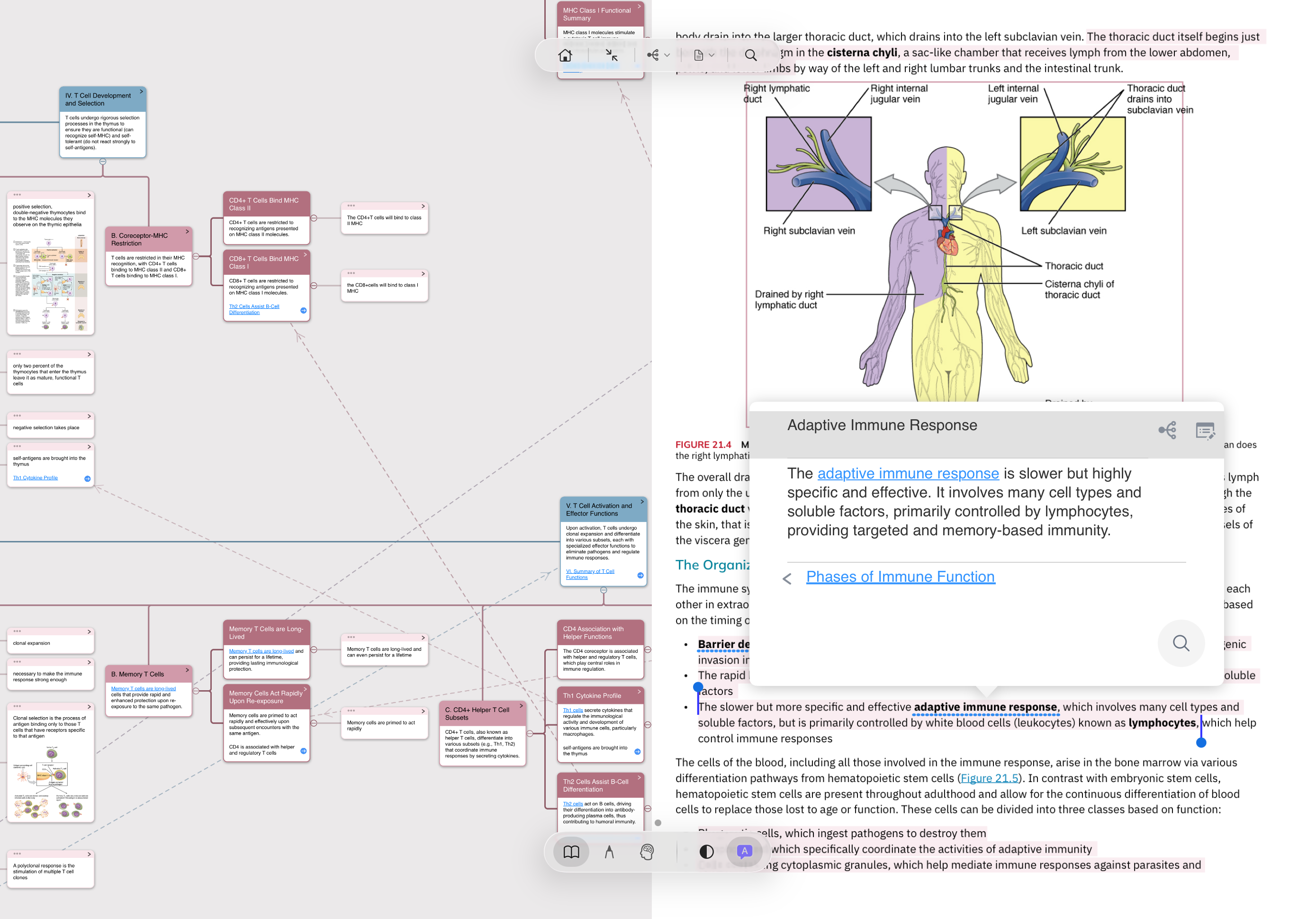
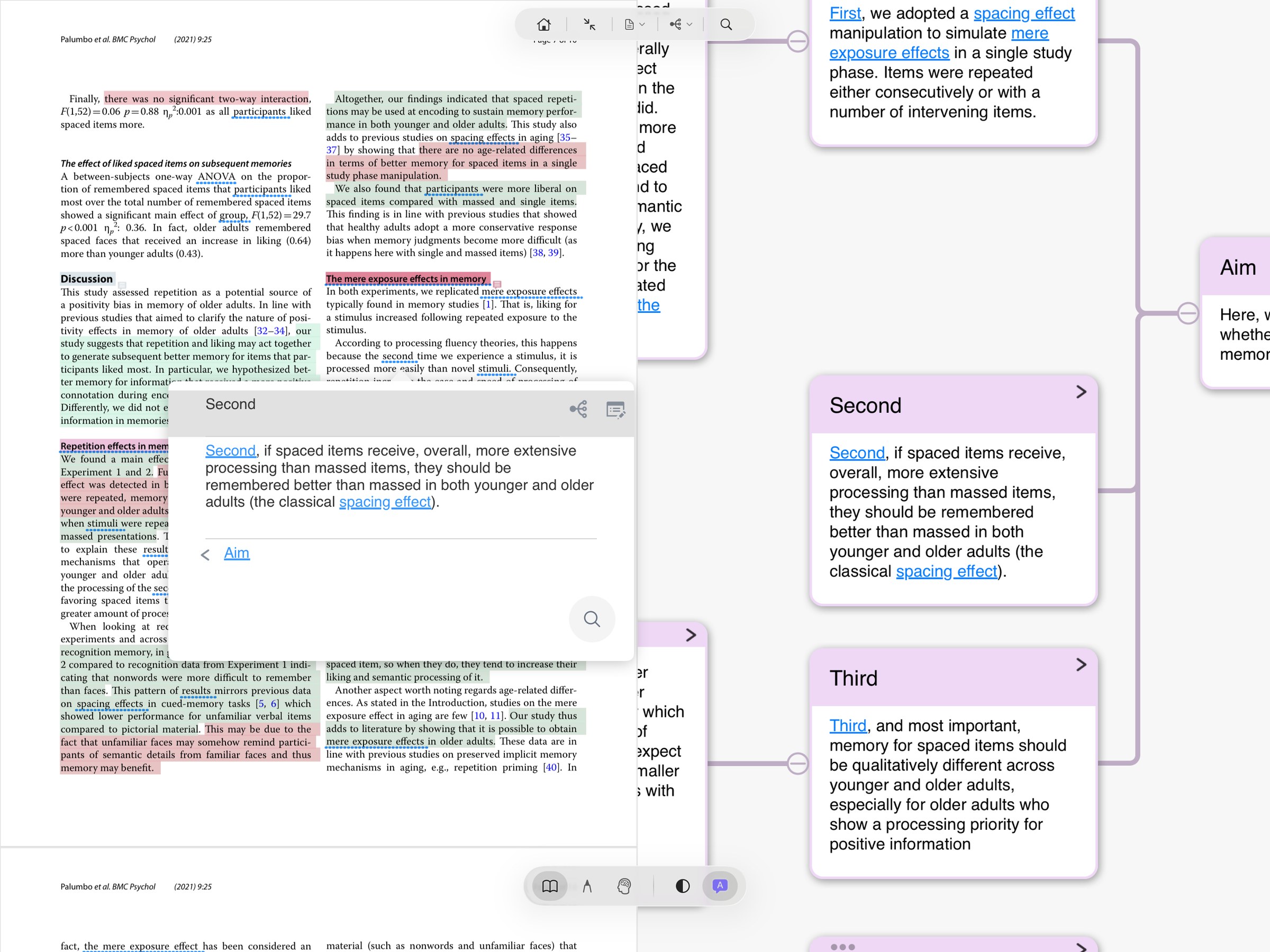
When you read a new book, a new paper, a new case, the notes you took on Robbins two years ago surface on their own — no clicking, no searching, no manually adding links. MN treats each card's title as a keyword and its annotation as the definition; whenever those keywords appear in a document you open, your past knowledge lights up on the new page. This isn't manual hyperlinking. It's knowledge networking itself.
30-second framing
You've used MN for 6+ months. Your subject is concept-dense and cross-referencing (medicine, law, research, languages). The same concept keeps reappearing across books and chapters — and you most want them to "recognize each other."
You just started with MN and your library is still empty — there's nothing to surface yet. Come back once you have 200+ cards. Or: you're using MN for pure fiction, where there's no structured concept to link.
"I learned this concept before, but I can't remember which book or chapter." Every long-term learner's core pain. Title Link makes every re-encounter surface its history automatically — you don't have to recall where you saw it.
Interactive Demo
The passage below simulates a page in a new book you just opened. On the right is your "past notes library" (4 cards). Hit "Begin reading" and watch MN reverse-match your old cards onto the new document. Click any highlighted keyword to pop up the original card with source page.
What this looks like in real use
Adaptive Immune Response card and shows where it sits in the Phases of Immune Function chain — you can step backward / forward.How it works
"Automatic backlinks" sounds like magic, but the mechanism is plain. The elegance is in re-reading every card as a dictionary entry.
The title you give a card while taking notes — say "Myocardial infarction" or "Promissory estoppel" — is automatically registered as a keyword in MN's Title Link dictionary. One card can hold multiple keywords (semicolon-separated): Myocardial infarction;MI;心肌梗死.
The "Myocardial infarction" card you made reading Robbins in 2022 and the one you made reading First Aid in 2024 share the same keyword entry. Five years of learning accumulate into one unified reverse index.
When you open any new document, MN scans the page text in real time and applies highlighting to any keyword that hits the dictionary. Click a highlight to jump to the original card and see your old annotation and source.
Multiple keywords: one card can carry several keywords, semicolon-separated. So "Myocardial infarction" and all its variants (MI, myocardial infarction, 心梗) can sit on the same card — whichever spelling shows up in the new document still hits.
Title-level linking only: MN links card titles, not every word inside the card. This is a deliberately restrained design — it prevents your notes from turning into a forest of hyperlinks. Some power users in the community have asked for "hierarchical bidirectional links" (linking down to subnodes inside a card) as an extension.
Performance: Title Link runs on a local dictionary match — no cloud, no AI, instant response. It shipped in MN 3.6.4 (2019) and has matured over years of iteration.
Evidence
"Automatic backlinks" as a concept isn't unique — Roam Research and Logseq do unlinked references too. But they all run inside their own note systems. MN embeds the same mechanism inside PDF reading — old notes surface as you read new documents. This three-way combination of "PDF reader + note library + backlinks" is something no other tool has shipped to date. Below is a real community discussion of the feature.
"Title Link is great, but if it could extend to hierarchical linking (e.g. a subnode of card A linking to a specific paragraph of card B), it would be even more powerful. I've been using this feature for 4 years — it's why I migrated from OneNote in the first place."
Title Link and manual search aren't the same thing — they're doing two different jobs:
1. Manually searching "where did I learn this before?" usually fails. You have to first realize you learned it, then remember the keyword, then type the search. Any of those three steps breaks the chain and the old note stays buried. Automatic surfacing skips the chain: the old note doesn't wait for you to recall it — it comes to you.
2. New information sticks better when it attaches to something old. But while reading you often don't realize which old idea the new material connects to. Automatic backlinks do that work for you — the system tends to know better than you which two-year-old card relates to what you're reading now.
3. It compounds. Each new card you add makes every future reading session a little richer, because of that one card. This is what long-term MN users mean when they say "the longer I use it, the harder it is to leave" — not lock-in, but that each reading session has more of your past work spontaneously participating.
If you want to think of this as "knowledge embodying itself automatically" — your past learning is no longer dead files in an archive cabinet, but something live that shows up on its own when you read new things — then you understand why this is core to MN's philosophy, not just a feature.
Free download · 14-day trial. macOS / iPadOS / iOS. To turn on Title Link: Preferences → Cards → Enable Title Link. The bigger your library, the more powerful it gets.