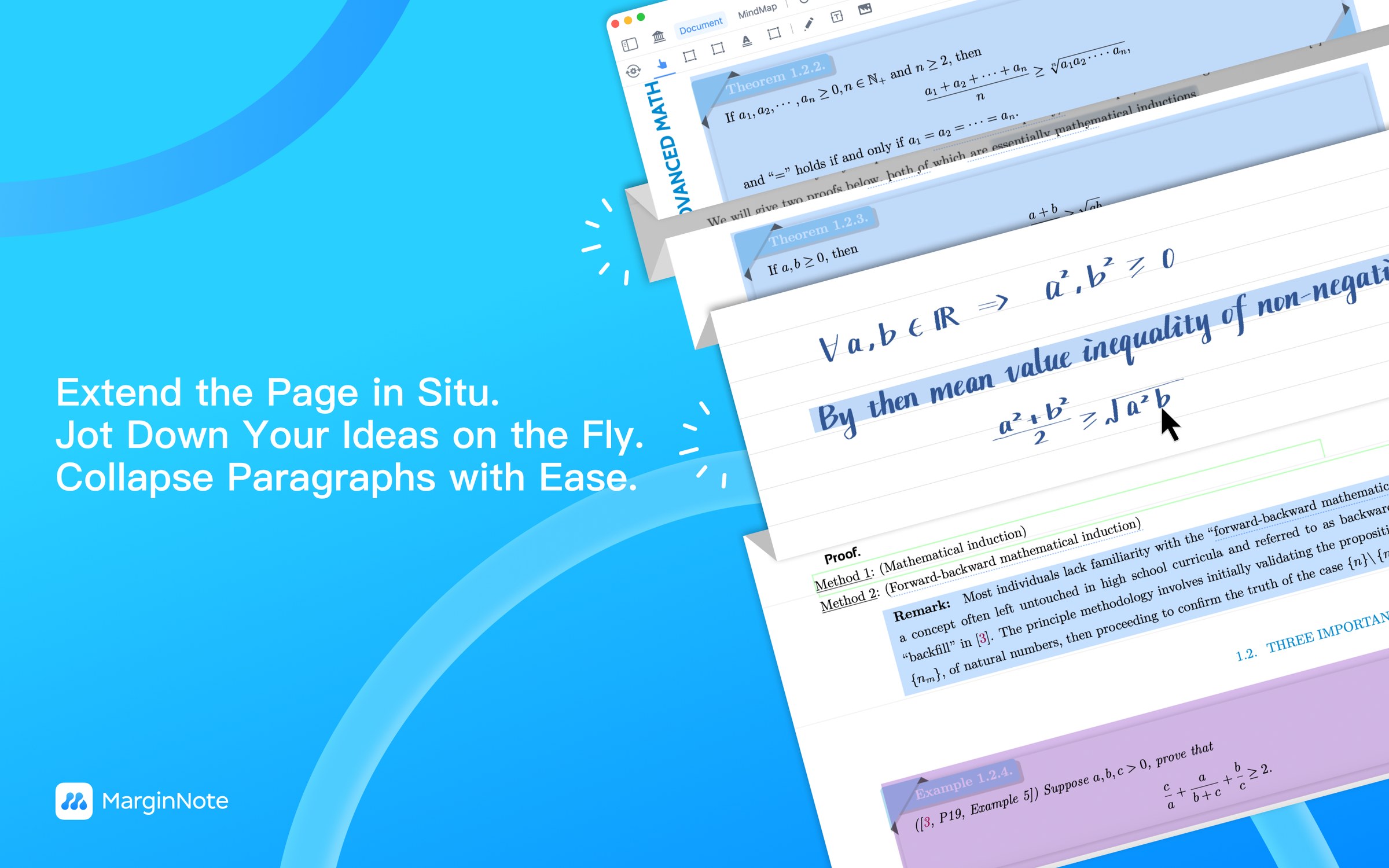
An Extended Note isn't a panel in the right sidebar, isn't a floating bubble, isn't a file in some other app — it's a writing space embedded in the PDF page itself. Long-press where you need it and the paper "splits open" at that moment to give you a place to write. It doesn't bind to any sentence or keyword — that's what makes it fundamentally different from Excerpt and Highlight. Three display modes you can switch between: Embedded (in the document) / Margin (docked at the side) / Collapsed (hidden).
30-second framing
You have thoughts that "don't belong to any one sentence but do belong to this page of reading": a math derivation; the mnemonic the lecturer recited (no specific sentence to attach it to); a counter-example you just thought of; a fresh summary that surfaces on your second pass; a related idea from somewhere else. Excerpt and Highlight can't carry these, and a generic notes app pulls you off the PDF.
Pure annotation-style notes — Highlight + Excerpt are enough, and binding to text is precisely their strength. Or: your notes lean heavily on Markdown / tables / code blocks — Extended Note is weaker there, pair with an external tool.
"I have a thought, but it doesn't belong to any specific sentence — it only belongs to this moment of reading this page." A traditional notes app forces you to put it in a separate file; ordinary PDF annotation forces you to bind it to a paragraph. Extended Note says: right where you wanted to write, an independent space — write, and the original text isn't touched.
Interactive demo · embedded + three modes
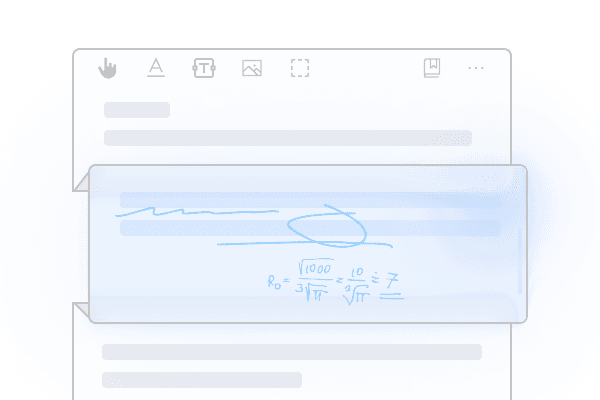
Below is a mock PDF page. Click the "Long-press here to open Extended Note" button (simulating a user long-pressing the gap between paragraphs) and a writing space unfolds embedded at that spot, pushing the content below it down. Then toggle the three mode buttons — the same note will switch between three placements: Embedded (in the document) / Margin (docked at the side) / Collapsed (a small icon, hidden).
Underlying mechanics
MN3 already had a "generic scratch space" — most notes apps have that. What MN4 actually introduces is the composite "embedded in the page + not bound to text + three switchable modes" — that required redesigning the document rendering pipeline at the architectural level. It's a genuinely version-defining new thing.
Not a toolbar button — long-press the document itself. "Anywhere" is literal: between paragraphs, inside a paragraph, at the bottom of the page, beside a chapter heading — all fine. The interaction signals: Extended Note isn't an "insert tool," it's "open right at the spot you want, in this moment."
At the long-press location, the document opens up space automatically — paragraphs below shift down, a new writing zone appears. The space auto-fits the note's size: write more, it grows; write less, it shrinks. So Extended Note isn't "overlaying" the PDF — the PDF "accepts" a new region in that moment.
The same Extended Note supports three display modes, switch any time: "Embedded" sits inline and grows the page; "Margin" docks it outside the right edge so the main text isn't interrupted; "Collapsed" tucks it down to a small icon, click to open. A natural transition from writing mode to reading mode.
"Doesn't bind to sentences or keywords" is deliberate. MN already has Excerpt (binds to a passage) and Highlight (binds to a word) — Extended Note is intentionally a different category: "doesn't attach to any specific text, only belongs to this page." This means Extended Note doesn't pollute your note system — it's a "scratch layer," not a "note layer."
Supports handwriting, text, images, formulas. iPad + Apple Pencil writes directly — strokes are stored as vectors and don't degrade when zoomed. Text input on Mac/iPhone. With the handwriting layer feature you can hide/show one round of writing — useful for "using the same book over multiple passes."
Multiple Extended Notes can stack. One page can hold many; the same spot can hold several layered. Your first-pass mnemonic and your second-pass summary can live in separate notes, coexisting in layers.
Optionally mark as isCard. This is MN's official design intent — any Extended Note can be marked as a flashcard and enter the SRS review queue. But user research finds this is a secondary use case — most users prize the "independent scratch space" itself. Card-ification is an opt-in add-on capability, not the main value. We're honest about putting it under "additional details," not "core value proposition."
Known limitation: Extended Note itself has weaker support for Markdown / tables / code blocks — one medical-coursework user reported "I had to export to an external Markdown editor to compress" (see "honest feedback on Extended Note's limits" below). For heavy reformatting needs, pair with an external tool.
Comparison · 5 places to write a note, side by side
This isn't "Extended Note beats the rest" — it's a map of the specific niche it fills. The other 4 categories each have their own strengths; Extended Note's unique combination is "embedded in document + not bound to text + persistent."
Evidence · real user language
Evidence comes from two independent sources: (1) positive reviews among 1,482 English App Store reviews that specifically call out "Extend" / "extend feature"; (2) deep workflow interviews with 9 heavy Chinese users (Notion field study, 2024). The two sources, in different languages, point at the same thing: Extended Note is the "embedded in the document + independent space" scratch slot.
"One of the best features, which was introduced in MN4, is the 'Extend': the ability to add/show notes embedded in the text (opening new lines). This is awesome."
"It took me a day or two to understand this new version of Marginnote, but it's the most useful app I've found... The extend feature is so useful for making contextual notes, and the fold feature allows for non relevant sections of the pdf to be hidden."
"Lecture-time handwritten Extended Notes + three-color highlighters — the bond between Extended Note and a PDF location is the core value."
note: "location bond" here means "physically embedded in a position," not "bound to text" — consistent with our reading of the mechanism.
"Excerpts from internal med, surgery, pediatrics, etc., from one system, all collected into one mind map → four-color importance system → second-pass online lectures, Extended Note adds the mnemonics." — a textbook "independent thought + physical proximity" usage.
"Extended Note for handwritten lecture-time notes → after class export to Obsidian, compress to 3–4 pages of refined Markdown. Pain point: Extended Note doesn't support Markdown; I'm forced to use OB instead." — we present this honestly: Extended Note isn't a panacea. Markdown-heavy scenarios still need an external tool alongside.
Extended Note looks like just "a writing slot in the PDF" — but underneath is a precise response to how thinking actually works.
1. Thinking has a real "drifting state" (Schön 1983, "reflection-in-action"). When you read a passage and a thought rises in your head — it's not "an annotation on this sentence," it's "something this paragraph triggered, still unformed, possibly relevant elsewhere too." If you force it to bind to "this sentence," you often distort what it actually meant. Excerpt and Highlight, in that situation, are a burden — not a tool.
2. The "scratch paper effect." In the paper-book era you wrote derivations, mnemonics, and your own words in the page margins. That content didn't belong to any one sentence — it was "your conversation with the book." Digital tools removed that space — you were forced either to "bind to a specific paragraph" (annotation) or "switch to another app" (notes software). Extended Note puts the stripped-out "scratch layer" back into digital reading.
3. It doesn't pollute your note system. This is something MN's official documentation repeats — Extended Note is independent of the notes/cards/mind-map system you've built. Worried that "scribbling carelessly will damage the card library I carefully maintained"? It won't — Extended Note isn't in that system at all. This "safe scribble space" matters especially for long-term users, lowering the threshold to "just start writing."
4. Three modes for three cognitive states. While you're thinking (writing mode) → use Embedded, let the page grow, focus on writing. When you're scanning back through (reading mode) → switch to Collapsed, keep the PDF clean. When you need main text and notes side by side (cross-reference mode) → switch to Margin, see both. One note, three placements — that fits the rhythm of real use, instead of forcing a single fixed shape.
Put it together: Extended Note treats "unformed thinking" as its own object worth careful handling — gives it a location without locking it, gives it space without polluting, gives it three placements instead of one fixed shape. That's why real-user research keeps coming back to the words "scratch," "independent," "embedded" — they're feeling the deeper design intent.
Free download of MarginNote 4 · 14-day trial. macOS / iPadOS / iOS. Open the PDF you're already reading, find the gap between two paragraphs, long-press — watch a writing space grow exactly where you needed it.