📌 Featured · Sync & Backup New architecture since MN 4.3

Since MN 4.3
Give your notes a real data architecture.

From MN 4.3, MarginNote rebuilt its data storage from the ground up — content-addressed object pool + Manifest. Apply git's "commit by version, address by hash" approach to your study data. Local integrity, backup, and cross-device sync are all applications. The "mind map corruption" and "lost handwriting" issues users reported for years are structurally fixed because the atomic unit moves from record to manifest.

01 · Foundation, not feature
A versioned data foundation (SHA-256 + manifest + atomic write) plus three application surfaces: local integrity, backup, cross-device sync. One foundation, three uses.
02 · Root cause of "corruption"
Old CloudKit Sync was record-level — one Study Set gets split across batches by CloudKit; partial failure leaves layout metadata and node positions out of sync. The new architecture is manifest-level: a Study Set either fully succeeds or fully fails.
03 · Three layers
Even without sync: Auto Backup creates local snapshots after 5-min idle; auto-snapshot before sync / before conflict; Full Export for any-time full archives you can keep yourself. Each layer is independent.

MN 3.x → 4.2: CloudKit Sync (record-level) + Full Export Since MN 4.3New data architecture · Auto Backup · Local integrity Coming Soon: Cloud Drive Sync

MarginNote data architecture and three application surfaces Local data flows into the data architecture (BackupStorage content-addressed object pool + Manifest versioning), which is reused by three applications: local integrity / Auto Backup / Cloud Drive Sync (Coming Soon). Full Export and CloudKit Sync are legacy mechanisms preserved for compatibility. Local MarginNote Data Study Sets · Cards · Excerpts · Mind Maps · Handwriting · Reviews · Docs SINCE MN 4.3 Data Architecture · BackupStorage + Manifest Apply git's versioning approach to study data Content-addressed pool SHA-256 + atomic write Manifest versioning versionNumber + deviceId SQLite transaction Atomic snapshot metadata REUSED IN THREE PLACES ① Local Integrity DEFAULT ON 5-min idle auto-snapshot Pre-sync / pre-conflict snapshot ② Auto Backup AVAILABLE Scheduled · incremental · versioned 4 destination backends ③ Cloud Drive Sync COMING SOON Manifest-level cross-device 3 cloud-drive backends → Crash / wrong edit recovery No sync, no remote backup needed → Any past version restorable Local · WebDAV · Baidu · Google → Multi-device consistency (snapshot) iCloud Drive · Baidu · Google LEGACY · PRESERVED FOR COMPATIBILITY Full Export Manual one-shot full archive, separate from new architecture .marginbackupall · 3 granularities Still preferred for migration / long-term archival CloudKit Sync Legacy record-level sync (since 2015) CloudKit private DB · same Apple ID devices ↔ Mutually exclusive with "Cloud Drive Sync" — pick one Blue = MN 4.3+ new architecture Yellow = Legacy (MN 4.2 and earlier) Dashed = Coming Soon

At the center is the data architecture itself (introduced in MN 4.3), reused in three places: local integrity safety net / Auto Backup / Cloud Drive Sync (Coming Soon). Below, Full Export and CloudKit Sync are legacy mechanisms (MN 4.2 and earlier), preserved alongside the new architecture.

NEW · Since MN 4.3
Apply git's versioning approach
to your study data.

Since MN 4.3, MarginNote introduced a versioned data foundation — not just "backup" or "sync", but a foundation reused in three places. This is the real architectural upgrade in this generation.

01

Object pool

Content-addressed SHA-256

Every piece of data is addressed by SHA-256 hash — identical content stored once. Files use writeToFile:atomically:YES; on index-insert failure, the just-written file is rolled back.

  • Loose objects + Pack files (>1000 / >50MB triggers pack)
  • Index can be rebuilt from objects
02

Manifest

Snapshot-level atomic unit

Each Study Set snapshot is a Manifest: versionNumber + deviceId + content hash + dependency graph. Sync and recovery operate on manifests, not fields or records.

  • This is the new architecture's core — a Study Set fully succeeds or fully fails
03

SQLite transaction

Metadata atomic commit

Snapshot metadata is committed inside a SQLite transaction. Either the snapshot lands fully, or it never appeared — no half-committed manifests.

  • BackupSnapshots_v4.sqlite (schema v6)

⚠ This isn't a single global ACID transaction across CoreData + object pool + snapshot DB. It's "object pool atomic + manifest atomic" as two separate atomicities. The user-facing experience is a version-control safety net, not a database-level ACID journal.

NEW · Since MN 4.3
Without sync, without external backup —
the architecture still protects your data.

"Lost handwriting", "mind map corruption", "notes vanished after crash" are MarginNote users' long-standing pain points. The new architecture catches edits as snapshots locally — no remote destination required.

DEFAULT

5-min idle snapshot

Edit a Study Set → marked dirty → if editing pauses 5 minutes → an immutable snapshot is committed locally.

  • Pre-sync auto-snapshot (default ON)
  • Pre-conflict auto-snapshot (default ON)
  • Post-sync snapshot (default OFF, avoids redundancy)
RECOVERY

Objects + index repairable

If object content fails hash verification — bad sectors, corrupted file — verifyIntegrity + rebuildIndex can rebuild the object index.

  • UI: Repair Missing Baseline Versions (Recommended) — only shown when uncovered Study Sets are detected

Honest boundary: the protection above relies on auto-snapshots being on (the default). If you manually disable auto-snapshot AND have never run a manual / baseline snapshot, "the state from one second before the crash" is not guaranteed by the code to be recoverable. What the architecture gives you is recovery to the most recent complete snapshot, not lossless per-keystroke versioning.

LEGACY · Since 2015
CloudKit Sync: record-level, Apple iCloud private DB, with structural baggage.

The legacy sync system since 2015. Built on CloudKit private database, keeps same-Apple-ID devices in sync. It's been MN's main sync for years — but it has a structural flaw, explained below.

What syncs

Study Sets (Topic) / Excerpts & Notes (BookNote) / Media attachments / Document config / FSRS review progress / Tags / Highlight styles

Single PDFs over 256 MB are not pushed to iCloud Documents — to avoid getting stuck.

Trigger mechanism

Change tracking: edit Study Set → mark dirty → background incremental sync

Real-time pull: CloudKit zone subscription listens for remote changes

Conflict handling (record-level)

CloudKit optimistic locking (CKRecordSaveIfServerRecordUnchanged) + field-level merge by hash / timestamp / dirty state. No StudySet-level integrity guarantee — that's the root of the "corruption" issue below.

Failure recovery

Token expired → auto-refresh; CloudKit partial failure → per-record handling; stuck? Reset iCloud Sync Buffer for full re-sync.

Why it can "corrupt"

The atomic unit is record, not StudySet

CloudKit Sync's smallest unit is CKRecord. Each Topic (Study Set) and BookNote is a separate record. The technical root of historical "mind map corruption" reports:

  • Layout metadata (Topic.optionsJson) and node positions (BookNote.mindpos) live in different records.
  • CKModifyRecordsOperation.atomic = YES only covers the current batch. A Study Set is split into multiple batches by CloudKit due to resultsLimit / media size.
  • Batch A succeeds (with Topic.optionsJson), Batch B fails (with some BookNote.mindpos) → remote layout points to non-existent positions → user perceives "mind map corrupted".

This isn't a one-off bug — it's the structural consequence of record-level sync. The new architecture (Cloud Drive Sync) fixes this by lifting the atomic unit to manifest — see below.

📌 Settings path: Settings → Cloud Sync → Note Database Sync Mode → CloudKit Sync. Requires iCloud sign-in.

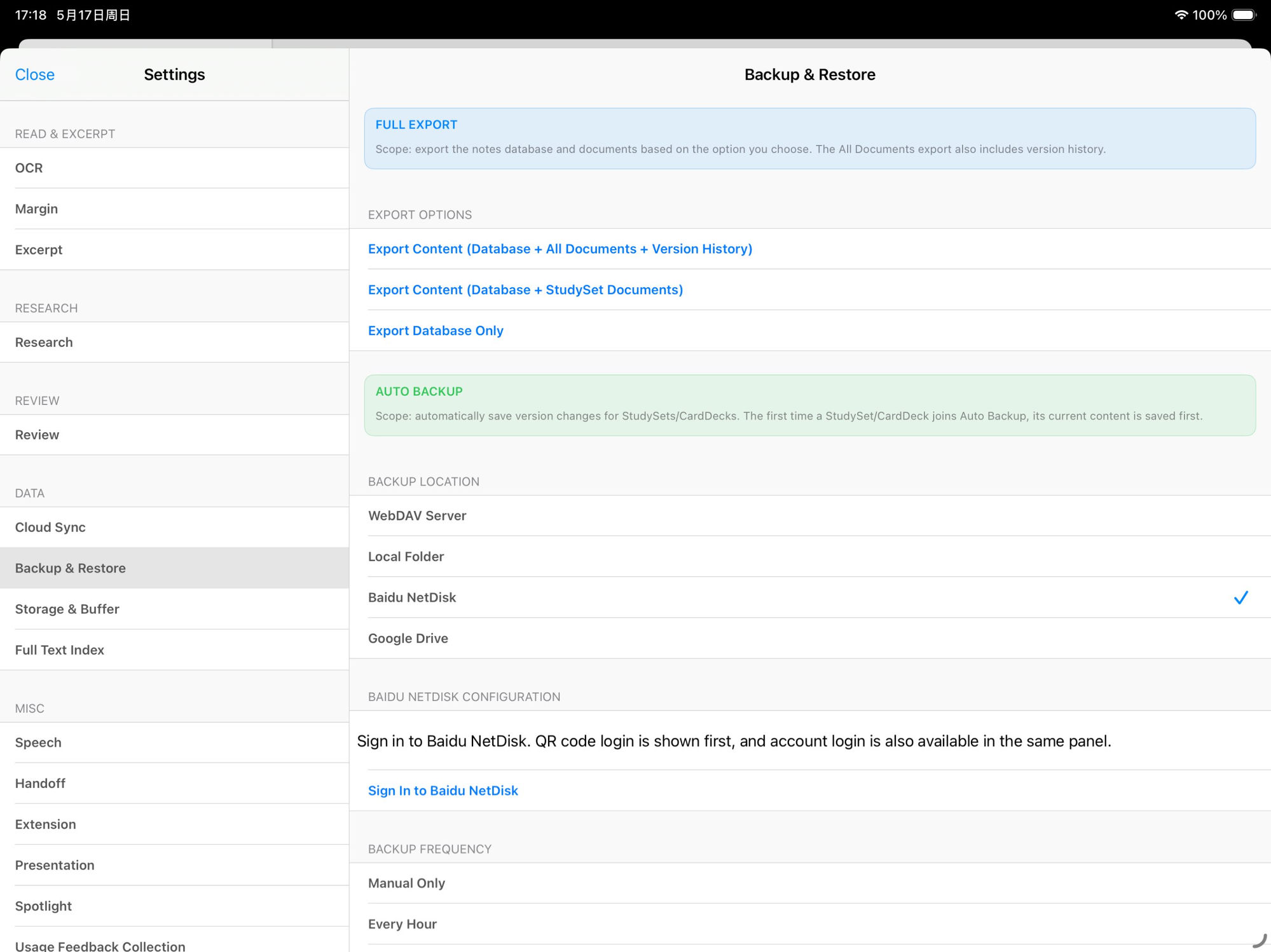
Two backup paths: Full Export (legacy) + Auto Backup (4.3 new).

The two paths are independent and can both be on — recommended. Full Export is the long-standing legacy mechanism (manual one-shot full archive); Auto Backup is MN 4.3's new architecture applied in the backup scenario (background incremental versioned).

Full Export LEGACY

Manual · One-shot · Long-standing

Settings → Backup & Restore → Full Export, three granularities:

  • Export Content (Database + All Documents + Version History) — full archive, best for migrating to a new device
  • Export Content (Database + StudySet Documents) — only PDFs linked to Study Sets, smaller
  • Export Database Only — note metadata only, no PDFs

Output: MarginNoteBackup(yyyy-MM-dd-HH-mm-ss).marginbackupall

You manage the package — store it wherever. The system never auto-uploads.

Auto Backup SINCE MN 4.3

Background · New architecture application · Since MN 4.3

Applies the new data architecture (object pool + Manifest) in the backup scenario — runs at the frequency you set, saves only what changed:

  • Backup Frequency: Manual Only / Every Hour / Every 6 Hours / Every 12 Hours / Daily / Weekly
  • Backup Location (4 options): Local Folder · WebDAV Server · Baidu NetDisk · Google Drive
  • Include Original Documents (PDF/Video): optional — fuller backup, larger size

Because it's an application of the new architecture, you get object dedup + content addressing for free. Identical content stored once; partial failure shows as missing objects (repairable), not as field corruption.

Defaults: 5-min idle no-edit triggers a snapshot; pre-sync auto-snapshot; pre-conflict auto-snapshot.

📌 Settings path: Settings → Backup & Restore. The two paths are independent — recommended to enable both.

MarginNote iPad Settings · Backup & Restore panel (English UI): Full Export (Database + All Documents + Version History / Database + StudySet Documents / Database Only) + Auto Backup with Backup Location options (WebDAV Server / Local Folder / Baidu NetDisk / Google Drive) + Baidu NetDisk Configuration + Backup Frequency
The real Settings → Backup & Restore panel (iPad). Full Export (three granularities) and Auto Backup (Local / WebDAV / Baidu / Google) are all on this one screen.
COMING SOON MN 4.3+ ARCHITECTURE

Cloud Drive Sync: apply "object pool + Manifest" to cross-device sync.

The next-generation sync system — mutually exclusive with CloudKit Sync (pick one in Settings). It's not "another CloudKit"; it's sync redone using MN 4.3's new data architecture. The atomic unit moves from record to manifest — and the structural class of issues like "mind map corruption" doesn't occur in the new architecture.

Supported cloud-drive backends (3)

iCloud Drive · Baidu NetDisk · Google Drive

OneDrive / Dropbox interfaces are reserved in code (currently hidden); WebDAV is backup-only, not in the Cloud Drive Sync options.

Atomic unit = Manifest

Every change creates an immutable snapshot: versionNumber + deviceId + content hash all live in the manifest.

Key difference: remote transfer can still half-fail, but it shows as missing objects or corrupted index (repairable) — never as "layout pointing to non-existent nodes".

Conflict UX (user-decided)

On a version conflict the UI offers three choices: Use Remote / Merge (default) / Keep Local.

Before merge, an automatic Pre-merge Backup is created — even if you pick wrong, the original is intact.

Cross-device recovery

First-launch on a new device pulls remote snapshots and reconstructs local data per manifest; optionally pulls original documents (PDF/Video) too.

Object index can be rebuilt; missing remote objects can be repaired via baseline-repair.

📌 Current state: code complete, UI gated by internal flag mn5SyncSupported; rollout schedule TBA.

Same "sync failure" —
old architecture corrupts, new architecture misses objects.

These two failure modes have completely different recovery costs. "Corruption" requires the user to manually identify which data is wrong, possibly to roll back or hand-fix. "Missing objects" is visible, locatable, automatically repairable — it tells you which hash didn't download fully and re-fetches. That's the difference MN 4.3's new architecture brings.

Dimension MN 4.2 and earlier (CKRecord-level) MN 4.3+ (Manifest-level)
Write atomicity CoreData save has atomicity, but sync layer's units are Topic / BookNote CKRecords Objects use writeToFile:atomically:YES; index-insert failure rolls back the just-written file; snapshot metadata in SQLite transaction
Sync atomicity
(all changes of one Study Set)
CKModifyRecordsOperation.atomic = YES only covers current batch; a Study Set is split across batches due to resultsLimit / media size The manifest is the visible unit; remote transfer can half-fail but shows as missing objects (repairable), not field corruption
Conflict unit record / field-level, relies on CloudKit save policy and changedKeys snapshot / manifest level, committed with versionNumber + deviceId + manifest hash
Half-failure state CKErrorPartialFailure → tracked failed/missed records; may use atomic = NO to clean reference errors. User feels: mind map corrupted Object pool may have missing objects or damaged index, but verifyIntegrity + rebuildIndex recover. User feels: prompted to re-sync objects
Rollback No StudySet-level immutable manifest to roll back to; relies on legacy backups or manual conflict handling Restore to any historical snapshot; baseline repair fills missing version coverage
Content hash verification Uses hashOfDataCRC for diff only — not whole-StudySet manifest content addressing Objects and manifests fully SHA-256 content-addressed
Cross-device consistency guarantee CloudKit record-level optimistic locking; full StudySet consistency must be reassembled across multiple records / batches Manifest / snapshot-level "version commit" — but still not CRDT, not realtime collab

Network down / conflicts / quota full / cross-account — all have fallbacks.

A sync & backup system's real value isn't when it works — it's when it breaks. This section maps recovery paths for every failure mode, so you know which button to press when things go sideways.

Sync status bar

Checking for updates / Preparing download / Downloading (n/m) / Preparing upload / Uploading (n/m) / Sync completed / Sync failed

Each state corresponds to a real sync stage — not vibes, actual progress.

Conflict UI (Cloud Drive Sync)

On detected version change: three choices — Use Remote / Merge / Keep Local. Default is "Merge", and a pre-merge backup is auto-created.

Reset Sync Buffer

If CloudKit Sync gets stuck or behaves oddly, you can reset the sync buffer in Settings → Cloud Sync — all data re-compares. Nuclear option, with second confirmation.

Manual Sync Backup

Every manual sync auto-backs-up the local DB to Documents/ManualSyncBackups, keeping the latest 5. Even if a conflict gets ugly, the last 5 manual-sync states are recoverable.

Manage CloudKit Zones

If you stop using CloudKit Sync and want to clear cloud data, the settings let you manually delete CloudKit zones — frees iCloud quota, local data unaffected.

Object Pool GC + Baseline Repair

The Cloud Drive Sync object pool exposes manual GC + baseline-version repair — fixes orphan objects and missing baselines that long-term usage can produce.

Some things MN does not promise.

"Never lose data" sounds great — but no engineering system can actually promise that. MN chooses not to overclaim, and instead tells you exactly what each layer of protection does.

Not realtime collab (CRDT / OT)

Sync is eventual consistency based on change tracking — multi-device align in seconds to minutes. It's not Google Docs character-level co-editing. MN doesn't do realtime collab.

Not full Git three-way merge

Cloud Drive Sync's merge is object-level by manifest / hash / timestamp — better than last-write-wins, but no full common-ancestor lookup yet. So "git for study notes" is a design analogy, not literal git equivalence.

Local protection requires snapshots

"The architecture itself protects data" relies on auto-snapshots being on (the default). If you manually disable auto-snapshot AND have never run a manual / baseline snapshot, the state from one second before a crash is not guaranteed by the code to be recoverable. What's recoverable is "the most recent complete snapshot".

No zero data loss promise

Cloud outages, full device failure, Apple ID issues, accidental deletes — all of these can happen. The new architecture + Auto Backup + Full Export reduce risk through layered protection, but no "absolute safety" claim. Recommended: periodic Full Export + one copy somewhere you control (external SSD / your own NAS / a cloud account different from your daily one).

About versions: the "new data architecture" described on this page was introduced in MN 4.3. "Cloud Drive Sync" is the next step built on that architecture, currently Coming Soon — the rollout schedule follows the official release notes.

Not just usable — trustable.

Download MarginNote 4 and put your notes into a tool that treats data safety as an explicit engineering job.