For Anki users

Anki solved when to review.
We're built for everything else.

Anki users tend to get stuck at the same few spots Anki itself was never built to handle — where cards come from, what to review first across many books, how to keep your daily queue from piling up. MarginNote fills in those spots. FSRS-native · apkg both ways · your AnKing deck keeps working.

"I am a doctor and using it in collaboration with Anki app. My most favourite feature is ability to reach concerning part of the book directly from an Anki card."
— Dr k nephro · Physician · 5-year user (MN3 + MN4, five ★★★★★ reviews 2019–2024) · App Store

Anki compatibility, before anything else.

FSRS-native scheduling
Same algorithm family Anki ships since v23.10. Built into MarginNote, not an add-on.
apkg in & out
Import your AnKing deck. Export anything you build. Round-trips supported for standard card types and image occlusion.
Image occlusion built-in
Same draw-rectangle, reveal-one-at-a-time mechanics as the Anki add-on. No plugin install.
Your existing collection still works
MarginNote is a parallel tool, not a migration. Run both for as long as you want.

Spaced repetition timing is one of them.

Anki nails "when to review." But heavy users typically run into the same few spots Anki was never built to handle — where cards come from, what to review first across many sources, how to keep some material out of the SRS queue without losing it. SuperMemo's creator Piotr Wozniak also pointed at these in his work on long-term retention.

MarginNote's design hypothesis: these parts deserve product surface, not external workarounds. The four sections below explain each one and what MN does about it.

01

Card-making cost

Self-made cards tend to stick better than downloaded ones — Anki's own manual recommends building your own deck. But most users grab AnKing in practice because typing each card is too slow. The gap is not "shared decks are bad"; it's "self-made beats shared, and the cost difference is the only reason you wouldn't."

02

Priority across many sources

With ten textbooks plus a deadline, "what should I review next?" is mostly left to your working memory. Anki's per-card ease adjustment doesn't operate at this layer. SuperMemo's priority queue + Auto-Postpone do — schedule across all open material, demoting low-priority items so they don't pile up as overdue.

03

Recall that doesn't have to enter the queue

Not everything worth remembering belongs in SRS — tomorrow's quiz, an attending's pimping question, anatomy you'll see again next block. Folding a mind-map node, hiding a highlight, covering a diagram — these are also retrieval, and they don't compound your daily card count. Anki assumes everything memorizable goes in the queue; that's a structural source of pile-up.

04

Chunked review units

Anki cards are isolated units; reviewing them out of their original chapter loses the context that helped encode them. Chapter 2 broken into 8 isolated cards is a structural loss. Block review treats a mind-map third-level branch as one review unit so the surrounding context stays in view.

The pile-up problem isn't theoretical.

A specific failure mode of long-running Anki decks is widely discussed in the Anki community under the name "ease hell": as cards lapse, intervals collapse, and overdue counts compound, daily review crowds out new learning. The literature most relevant to MarginNote's positioning is not our user research — it's what the Anki community itself has documented:

Three independent sources, all from outside MarginNote:

1. The FSRS team itself. The maintainers of FSRS (the new default scheduler in Anki since v23.10) state plainly: "Ease hell was a major issue with the legacy SM-2 algorithm." The new algorithm fixes the algorithmic side of pile-up — but acknowledges the problem was real. srs-benchmark project, history of FSRS (LessWrong).
2. Anki forums. Multi-year threads — including some titled "Ease hell is a myth?" arguing both for and against — show the community treats this as a structural issue worth contesting, not a fringe complaint. "Ease-Hellish in FSRS", "Ease hell is a myth?".
3. Independent technical writers. Long-form essays from Anki users who hit the wall and wrote about it: readbroca.com on Ease Hell, skerritt.blog on Difficulty Hell. Both predate FSRS adoption.

What FSRS solved is the algorithmic component of pile-up — over-aggressive interval shrinkage on lapse. What it did not solve is the structural component: some material doesn't actually need long-term spacing, and putting it in the queue at all is the original mistake. Tomorrow's quiz, an attending's pimping question, anatomy you'll re-encounter next block — these don't need to compound your daily review count to be remembered. That's the gap MarginNote's light-track recall fills (Gap 3 above).

Six product mechanisms, mapped to the four above.

We don't claim MN produces better memory outcomes than Anki — that would need a controlled study we haven't run. What's listed below is what the product actually does, mapped to the four points above.

For 01 · Card making

One-tap excerpt. The card already exists.

Highlighting a sentence in any PDF generates a card with the source page as the back. Five highlight colors map to five card types. Cloze deletion happens directly on the PDF. Image occlusion is built in. Self-made cards drop from "scheduled work" to "incidental act while reading."

For 02 · Priority across sources

Hosted learning plan, not per-card ease.

Add material to the plan once. The system schedules across books, weighing weak-spot tags, deadlines, and recency. When today is heavy, low-priority items slide forward automatically rather than piling up. Multi-source overload moves from "user's problem" to "scheduler's problem."

For 03 · Light-track recall

Recall mechanisms that don't enter the queue.

Mind-map node folding, highlight blanking, rectangle & highlighter occlusion with recall mode, handwriting layer hide/show. Each is a retrieval attempt. None adds to your daily review count. The SRS queue gets reserved for material that genuinely warrants long-term spacing.

For 04 · Chunks stay attached

Cards live on a four-level ladder.

Every card stays linked to book → chapter → mind-map node → source paragraph. During review, the surrounding chunk is one tap away. Block review lets you treat a third-level branch as a single review unit instead of eight isolated cards. Tag-bound chunks (e.g. #renal #weak) let you review a topic as a contextualized session.

Compatibility back-stop

FSRS scheduler, apkg in/out.

Same algorithm family Anki uses. Bidirectional apkg means your AnKing deck imports, and anything you build in MN exports back as a separate deck Anki can layer in. You don't choose between MN and Anki; you choose how to allocate work between them.

Extra · filter-based priority

Priority adjustment as a filter, not a scheduler tweak.

Inside the queue, priority adjustment is a filter operation. color = red AND tag = weak AND added < 7d assembles a temporary review session in two taps. No deck restructuring, no per-card ease tweaks.
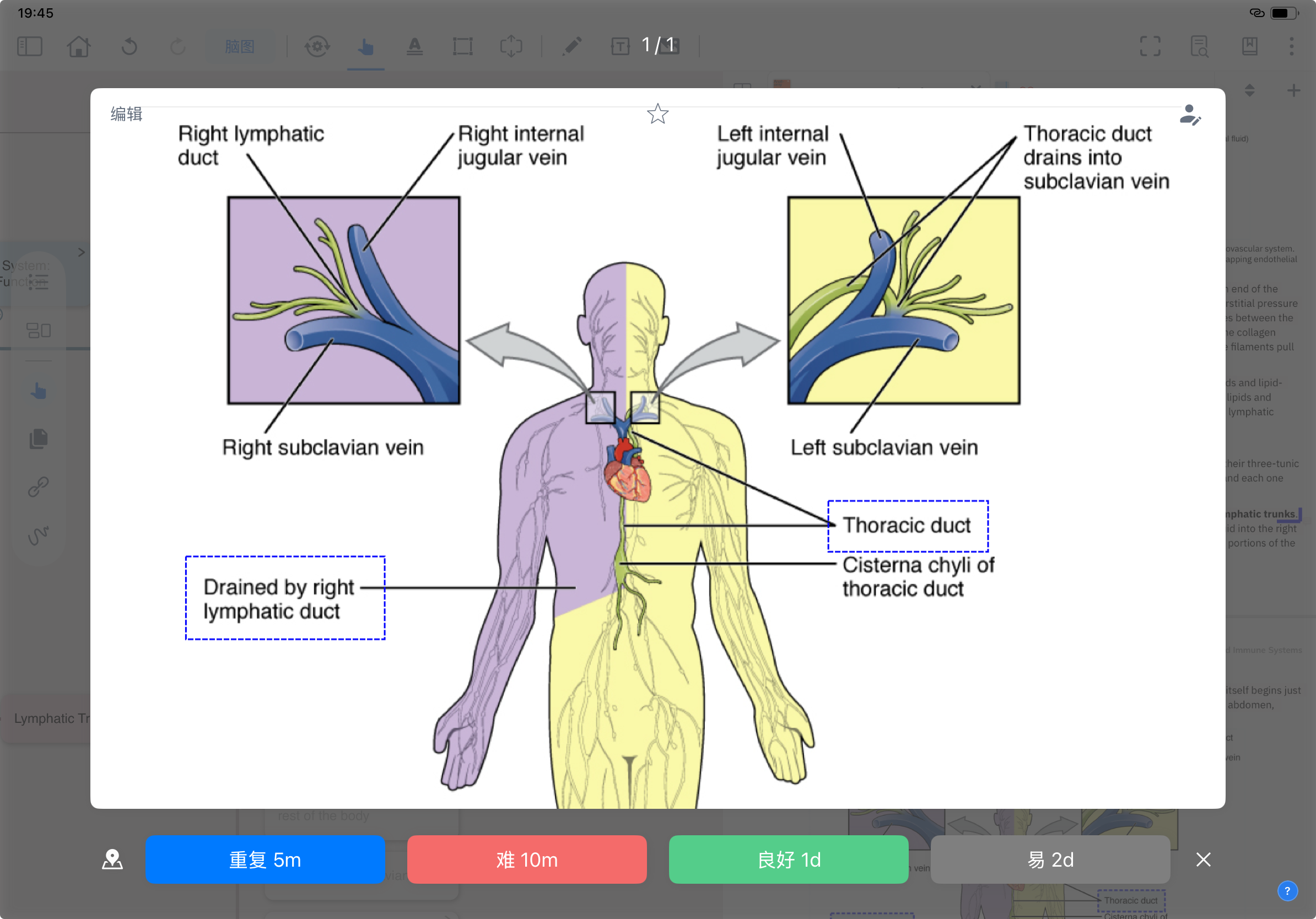
MarginNote iPad Review Mode actual interface: lymphatic-system anatomy card (lymphatic trunk drainage) + FSRS four-button rating at the bottom: Again 5m / Hard 10m / Good 1d / Easy 2d
FSRS Review Mode real screenshot — the four rating buttons (Again 5m / Hard 10m / Good 1d / Easy 2d) are the same algorithm family Anki uses. There's no "MN's algorithm is better" claim. The difference is upstream — where cards come from and how they're queued — which is what the 03 section above is about.

Three users on the actual change.

Verbatim from the App Store. Author handles, dates, countries, and review IDs are recorded for audit. Selected from a 1,482-review English corpus retrieved via the Appfigures API.

"Most importantly, this is hands down the most intuitive and effective reading, note-taking, research, and writing tool I have ever tried. The method I have developed works exactly like I always wanted it with Margin Note 3 and offered more that I didn't even know I needed or wanted. I love that the notes highlighted link between the mindmap and the document, unlike notability, adobe, and Evernote."

L
Lizzy3pt0 · ★★★★★
Researcher · US App Store · Dec 29, 2022
Verbatim from "90% perfect, but the last 10% really bothers me" · MN3 (iOS) · review_id 280803903327LYbJwB-9W6vGuVX4ODTzRWQ

"Throughout medical school and residency I was constantly looking for a program that let me upload electronic textbooks to highlight and annotate with easy referencing. I tried everything, Goodnotes, Onenote, Evernote - you name it I tried it, and while they all worked fine/ok for annotation and highlighting, they all struggled when it came to reviewing what I'd already gone over. Once I found MarginNote I was hooked."

J
JMayYXE · ★★★★★
Physician · Canadian App Store · Apr 14, 2022
Verbatim from "Best Note Taking Software Period - Physician Approved!" · MN3 (Mac) · review_id 280893313767LEKQwcqOb0XOzuW__JyTczA

"Forget Notability or Goodnotes, this is the app you want. You can make space as margins around textbooks (hence margin note) but now you can even split the book at any position to make space to write as much as you want - a feature criminally lacking in all other apps. You can make mind maps, review items using spaced repetition, and have an infinite canvas to write on (some other ENTIRE apps are JUST that, here it is dropped so casually as an add on feature)."

D
DoctorWho777 · ★★★★★
Long-time MarginNote user · South African App Store · May 18, 2024
Verbatim from "A perfect app, made even better" · MarginNote 4 · review_id 337383547083LsYEvtzhhHTU7x7iDqzBKSQ

What we are not claiming.

We have written this comparison page to be defensible, not promotional. The lines we will not cross:

Try it,
see how those four things land in MN.

Free 14-day trial. macOS and iPadOS. FSRS-native. apkg in/out. Your AnKing deck still works.